

Viewing Patients and Outliers
Last updated June 12, 2026
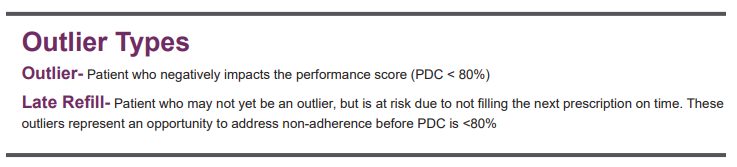
EQUIPP® provides various views of patients and outliers attributed to your pharmacy to support your pharmacy's performance improvement plan. Outliers are patients who are not meeting the intent of the quality measure (e.g. not adherent) and represent targets for improvement. The outlier reports provide lists of patients who are adversely impacting or may adversely impact your quality measure performance now or in the future for measures hosted in the EQUIPP dashboard. By addressing these patients, you are taking steps to improve patient care and affect your performance rates down the road.
Outlier Updates
PQS calculates outliers in most cases on a monthly basis, however, in some instances the data provider shares the outlier information directly. In such cases, they may be using a more recent time frame to identify patient outliers, therefore, some patient outliers may not reflect the performance data date range being displayed and may be updated daily.
Viewing Patients and Outliers - How to Find Patients and Outliers
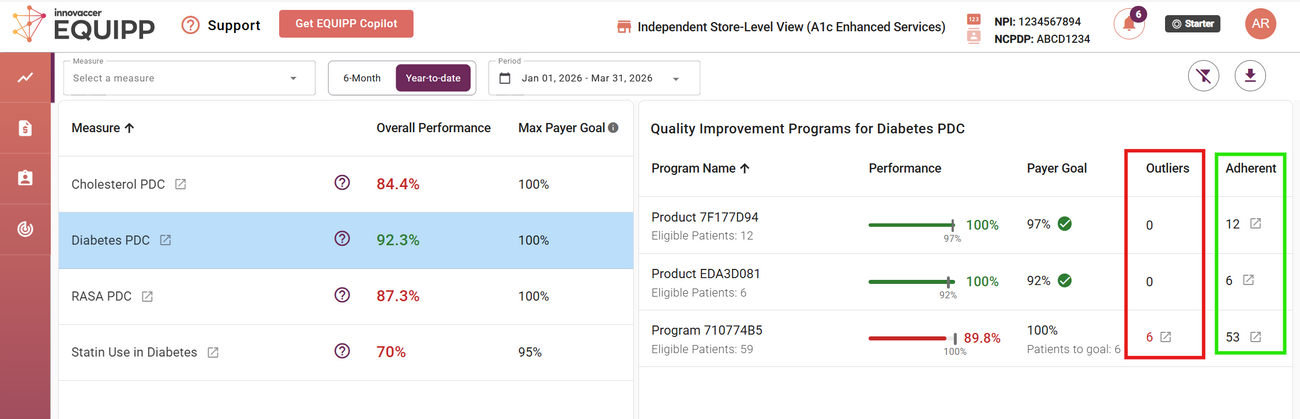
1. Performance Dashboard - View outliers and patients by measure
The number of outliers and patients in a measure are clearly defined inside the program name.
• Select “Outliers” to view patients who are not yet meeting the intent of the measure.
• Select “Adherent” to view patients who are adherent included in the measure evaluation.
2. Measure Performance Page - View patients by payer program
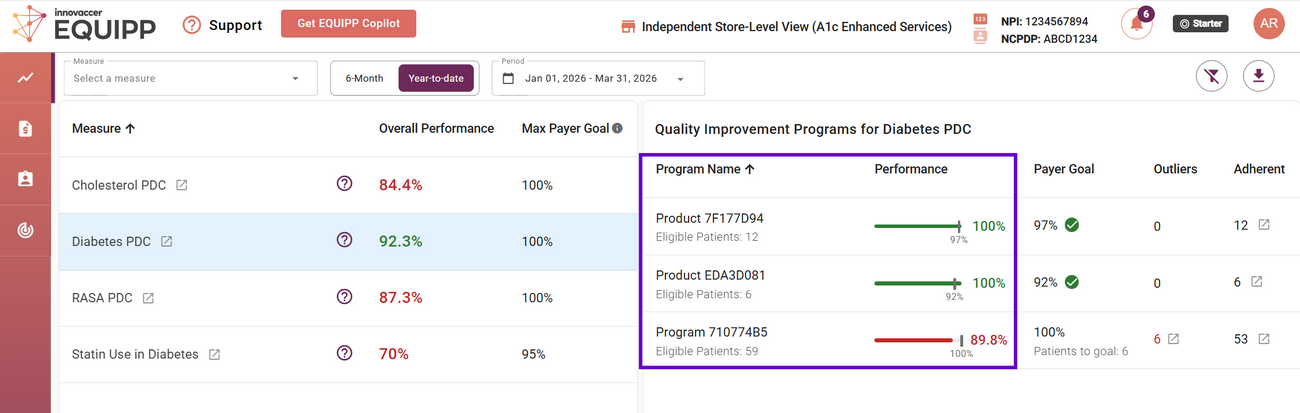
Patients can be reviewed by health plan for applicable measures through the Quality Improvement Programs table within the Measure Performance page. This payer-specific view can help identify patients who are contributing to a particular performance program.
3. All Patients View - View all patients for all measures and health plans
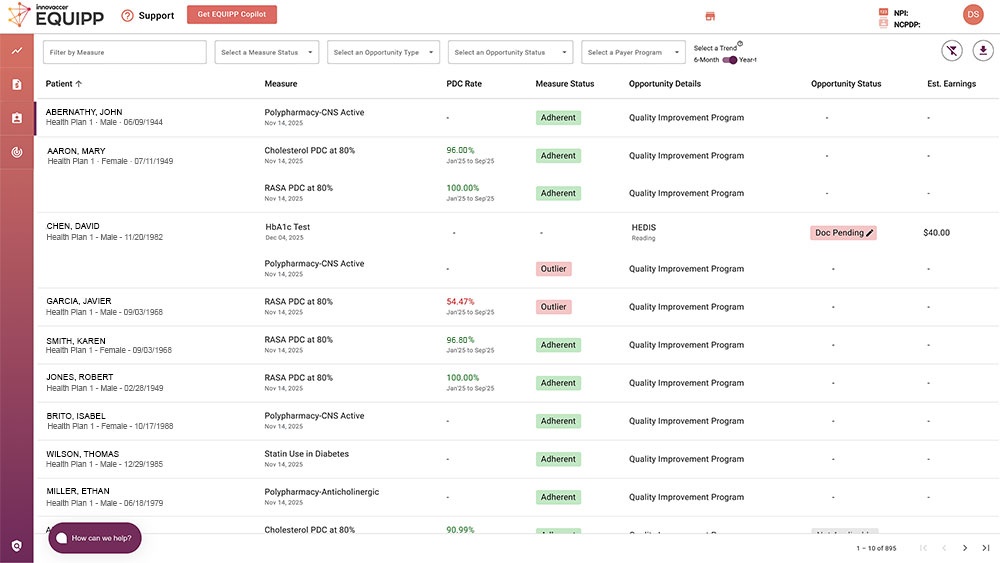
The All Patients View is a comprehensive view of all patients attributed to your pharmacy across all measures and health plans within the EQUIPP platform. This feature allows you to prioritize your patients through customizable filter and sorting options.
Outlier Note Tool
Outlier notes is a featured tool to help pharmacies keep efforts organized among various staff members working on patient adherence improvement opportunities. While the notes section attached to the specific patient does not change performance scores, it can be used to indicate actions taken by the pharmacy staff, barriers encountered by the patient that impact their medication adherence, and outcomes from the actions taken.
*Please Note: The notes feature within the Performance Measures patients is not required however, some Payer Programs do require documentation to be eligible for a bonus payment.
Patient Details
Patient details can be viewed by clicking on the patient's name. The patient details include the PDC Rate, Measure Status, Designations, Payer Program, and Documentation Status for all of the measures that the patient is impacting.
Outlier Designations
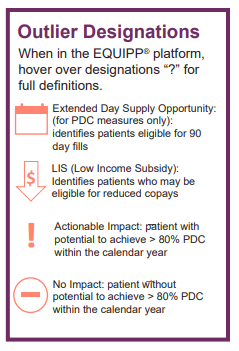
When viewing patient outliers, there may be one or more symbols present within the 'Designations' column. Please see below for the symbol descriptions:
- Actionable Impact - The patient can achieve the adherence PDC goal by the end of the measurement year
- No Impact - The patient cannot achieve the adherence PDC goal by the end of the measurement year
- Extended Day Supply Opportunity - The patient is eligible for more than a 30-day supply of at least one medication within this measure
- LIS - Low Income Subsidy - Patient can receive a 90-day supply at the same co-pay of a 30-day supply
- Late Refill - The patient was or is late to refill their medication. Late refills may be identified as prescriptions that are anywhere from 11 - 17 days past due (May apply to patients that are above 80% adherent)
- Bonus Eligible Patient - The patient is eligible for a bonus opportunity provided by the health plan. The bonus amounts are determined by the pharmacy performance score for the health plan at year-end
Optimize and Prioritize Your Patient Review
When reviewing outliers and patients, the following columns can be filtered or sorted to customize the view:
- Last/First Name, Date of Birth, Payer Program, Measure Name, PDC Rate (high to low, low to high), and documentation status (Complete - Not Started)
- Sorting by PDC rate can prioritize the patients that are closest to becoming adherent
- Sorting by Payer Program can prioritize the patients that belong to programs that have greater impacts on each pharmacy